

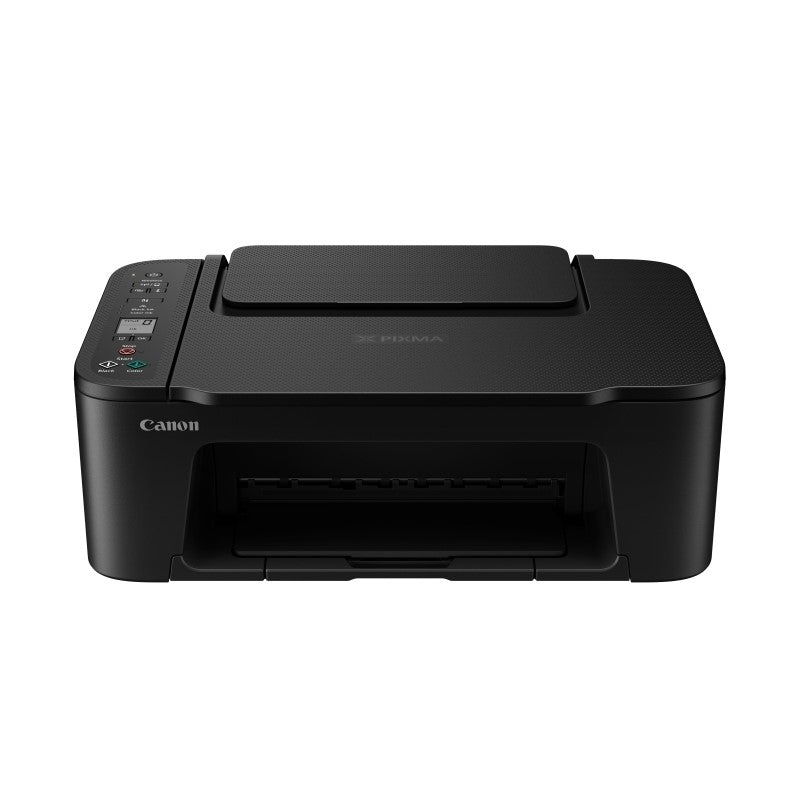
Canon Pixma Home Printer - Black
Canon Pixma Home Printer - Black
Model:
CPTS3660
Ipn:
834640

Include a Back Up Plan?
Learn moremanufacturer's warranty
How do I get it?
 Related Promotions
 Related Promotions
-

If your home feels like it needs a lift, you don’t necessarily need a renovation. A few well-chosen upgrades can change the atmosphere almost immediately. 1. A Bigger TV Upgrading...
-

You don’t need new cabinetry or a full renovation to refresh your kitchen. Sometimes it’s the smaller upgrades — the ones you use every single day — that change how...
-

There’s something special about setting up your first home. Every decision feels significant — and exciting. When it comes to appliances, striking the right balance between investment and practicality helps...
-

Honour your mum this Mother's Day with a gesture that goes beyond the ordinary, one that reflects her unique personality and passions. Our carefully crafted gift guide is filled with thoughtful options from renowned brands, designed to help you find that perfect expression of your affection and appreciation. We recognize the diverse interests and hobbies that mums may have, which is why our guide spans a range of categories, ensuring you can find something that will truly resonate with her. From kitchen wonders to personal pampering, our suggestions are tailored to make her feel special. Explore our detailed recommendations below to find the ultimate Mother's Day gift that celebrates her uniqueness.
-

The End of Financial Year (EOFY) Clearance is a golden opportunity for Australian shoppers to grab phenomenal discounts and unbeatable offers. Here’s your guide to navigating these fantastic sales events.
-
November’s here, and that means it’s nearly time for Black Friday deals! If you’re looking to score big on home appliances, Black Friday is the perfect time to upgrade. From fridges and washing machines to TVs and vacuums, planning when to shop could make a big difference in how much you save. So, should you start early, or is waiting until later in the day the smarter move? Let’s look at the pros and cons to help you decide.
-
Black Friday has been consistently on the rise on a global scale, becoming a premier moment to grab extraordinary discounts and unbelievably low prices. Before you dive into your shopping spree, let's uncover ways to prepare and maximise your Black Friday savings.
-

Black Friday sales provide a fantastic chance to seize substantial discounts and unbeatable savings. Dive into the ultimate shopping fiesta with Billy Guyatts' Black Friday Sale. Prepare to be astounded by substantial discounts on high-end products like TVs, soundbars, and home appliances. Gain insights on how to master Black Friday shopping with strategic planning, starting with extensive research on your desired items to understand their real value. Build a focused shopping list, jumpstart your holiday gift buying, and support local businesses for a rewarding shopping experience. Embrace early shopping to snag the best deals and utilize price matching for additional savings. Explore convenient 'Buy Now, Pay Later' options for a budget-friendly spree, and compare Black Friday and Cyber Monday sales for the best offers. Get ready to shop like a pro and make the most of this year’s Black Friday and Cyber Monday deals at Billy Guyatts!


Collapsible content
Overview
description
specifications
-
BrandCanon
-
IPN834640
-
ModelCPTS3660
-
Manufacturer's Warranty1 Year
-
SizeALL
-
Width435 mm
-
Height145 mm
-
Depth327 mm
-
Colour/FinishBLACK
-
Ink TypePGBK CRG, Colour CRG (C/M/Y)
-
Maximum Print Resolution4,800 dpi x 1,200 dpi
-
Display1.5” / 3.7cm Segment LCD (Monochrome)
-
InterfaceUSB-B Hi-Speed
-
ConnectivityWireless LAN 2.4GHz & 5GHz, Direct Connection (Wireless LAN)
-
Input PowerAC 100-240 V, 50 / 60 Hz
-
Document ColourApprox. 4.0 ipm
-
Document Black & WhiteApprox. 7.7 ipm
-
Photo(4” x 6”)65 seconds
-
OFFApprox. 0.3 W
-
Copying USB connection to PCApprox. 9 W
-
Standby (MFPscanning lamp is off) USB connection to PC: Approx. 0.8 W
-
Standby (all ports connected, MFPscanning lamp is off) : Approx. 1.3 W
-
Time to enter Standby modeApprox. 10 min 01 seconds
-
Operating EnvironmentTemperature: 5 - 35 °C Humidity: 10 - 90 %RH (no dew condensation)
-
Recommended EnvironmentTemperature: 15 -30 °C Humidity: 10 - 80 %RH (no dew condensation)
-
Storage EnvironmentTemperature: 0 - 40 °C Humidity: 5 - 95 %RH (no dew condensation)
-
Quiet ModeAvailable
-
Acoustic Noise (PC print) Plain PaperApprox. 48.0 dB(A)
-
Number of NozzlesTotal 1,280 nozzles (PGBK/C/M/Y: 320 nozzles)
-
Compatible InksPGBK: PG-645, PG-645XL, Colour: CL-646, CL-646XL
-
Up to203.2 mm (8 inch)
-
BorderlessUp to 127 mm (5 inch)
-
Borderless Printing Top / Bottom / Right / Left margineach 0 mm
-
Bordered PrintingLTR/LGL, Top margin: 3 mm, Bottom margin: 5 mm, Left/Right margin: each 6.4 mm
-
Bordered Auto 2-Sided PrintingN/A
-
Rear TrayPlain Paper (64 g/m2 - 105 g/m2), Photo Paper Plus Glossy II (PP-301), Photo Paper Glossy (GP-701), Magnetic Photo Paper (MG-101), Re-stickable Photo Paper (RP-101)
-
Front TrayN/A
-
Rear TrayA4, A5, B5, LTR, LGL, 4" x 6", 5" x 7", Square (127 mm x 127 mm), Custom Size (width: 89 mm - 215.9 mm, length: 127 - 676 mm)
-
Front TrayN/A
-
Size4" x 6", 5" x 7", Square (127 mm x 127 mm)
-
Rear TrayPlain Paper - A4/LTR: 60, 4”x6” Photo Paper Plus, Glossy II (PP-301), Photo Paper Glossy (GP-701): 20, 5”x7” Photo Paper Plus Glossy II (PP-301): 10
-
Front TrayN/A
-
Rear TrayPlain Paper: 64 g/m2 - 105 g/m2, Canon paper: Max. paper weight Approx. 275 g/m2, Photo Paper Plus Glossy II (PP-301)
-
Front TrayN/A
-
Scanner TypeFlatbed
-
Optical Resolution600 dpi x 1,200 dpi
-
Scanning Bit Depth (Input/Output)Grayscale: 16 bit / 8 bit, Colour: RGB each 16 bit / 8 bit
-
Maximum Document SizeA4 / LTR (216 x 297 mm)
-
Maximum Document SizeA4/LTR (216 x 297 mm)
-
Compatible MediaPlain Paper (64 g/m2 - 105 g/m2), Photo Paper Plus Glossy II (PP-301)
-
Image Quality2 positions (Draft, Standard)
-
Multiple CopyBlack & White / Colour: max. 20 pages
-
Available forAirPrint / Mopria / PIXMA Cloud Link / Canon PRINT app (for iOS / Android) / Camera Direct (WLAN)
-
Minimum System RequirementsWindows: Windows 11, Windows 10, Windows 8.1, Windows 7 SP1, Mac: MacOS v 10.15.7 ~ 14, iOS®, iPadOS, Android, ChromeOS
-
What’s in the BoxPrinter, Power cord, Ink cartridges setup, CD setup, Getting started guide
features
- Wireless 3-in-1 (Print, Copy, Scan)
- Borderless printing
- Prints on a range of media options
- 1.5" mono segment LCD screen
- 600x1200 dpi flatbed scanner
Delivery & Returns
delivery & returns
Delivery
We deliver Australia-wide via Australia Post, courier, or freight depending on parcel size. Tracking is provided and most deliveries arrive within 4–10 business days.
Returns
Returns are accepted within 10 days for unused items in original packaging (restocking fees may apply). Faulty or damaged products are covered under warranty or Australian Consumer Law - learn more.
Payment Options
payment options
We accept Visa, Mastercard, Amex, PayPal, Apple Pay - Learn more.
Pay Your Way options include Afterpay, Zip, Humm, and Latitude (T&Cs apply).
Back up plans
back up plans
The Back Up Plan offers peace of mind by covering mechanical or electrical failures after the manufacturer’s warranty ends. It does not replace or limit your rights under the Australian Consumer Guarantees.
Two Plan Types:
Replacement Cover Plan:
For products under $500. Provides a one-time replacement starting 12 months after purchase or when the manufacturer's warranty ends—whichever is later.
Repair Cover Plan:
Available for most products. Covers repairs once the manufacturer’s warranty expires. In some cases, products may be replaced (see Replacement Terms).
Learn more about Back Up Plans.


